Assembly Language and System Programming
Fall 2006
Instructions
to Set Up Visual
C++ 2005 Express for Assignment 3
1.
To
build a windows program in Visual C++ 2005 Express, you need some additional
include files (such as windows.h) during compilation and some additional library files (such as user32.lib,
gdi32.lib…etc.) for
linking. To obtain those files,
follow either one of the two methods below:
(a) The first method works only if
you have previously installed a different version of VC++. If you have a different version of
VC++, then you probably already have the required include and library files (in
folders like C:\Program Files\Microsoft Visual Studio\VC98).
(b) If the first method does not work
for you, then please download the “Platform
SDK” from Microsoft. To reduce
the download size, you may choose the “custom build” mode and select only the
“Microsoft Windows Core SDK” – “Build Environment (x86 32-bit).” 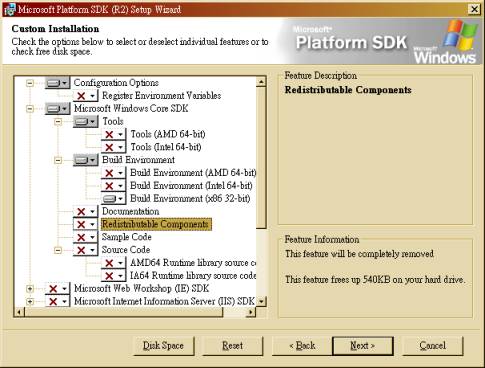
2.
Then follow the instructions in http://msdn.microsoft.com/vstudio/express/visualc/usingpsdk/
(Steps 3 and 4) to reconfigure Visual C++ 2005 Express, so it can find the new include
and library files. If you use method (a) in the previous
step, then remember to change “C:\Program Files\Microsoft Platform SDK Server 2003
R2\…” to the path
that contains your version of VC++.
(Note: NOT the Express edition.) 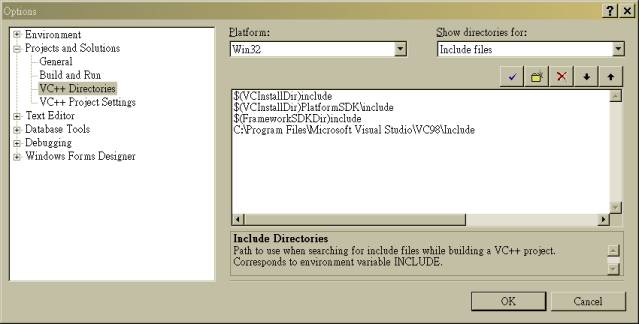
3.
If
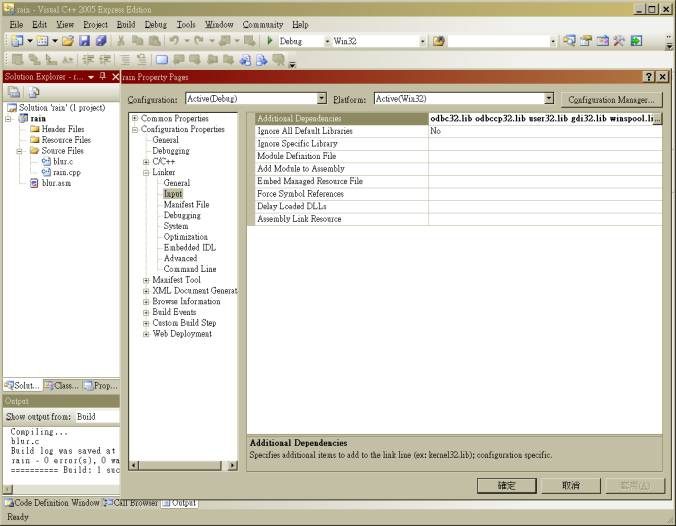
you get an error because of the missing odbc32.lib and odbccp32.lib files, then right click on the
project name, select “Properties” – “Configuration Properties” – “Linker” –
“Input” and remove odbc32.lib and odbccp32.lib there.